Roster each service
Restaurants don't run one shift a day. CrewConnect is built for breakfast, lunch and dinner, kitchen and floor, and staff who work more than one venue.
- Split shifts: roster lunch and dinner separately. Each clock-in attaches to the right shift.
- Unavailability first: staff mark when they can't work, so you see it while you roster, not after.
- Wage cost per location as you build the week, from each person's hourly rate.
- Copy last week and adjust, rather than starting from scratch.
- More than one venue on every plan, with staff who can work at any of them.
Staff clock in and out and take breaks on their own phone, and you get a timesheet and pay summary for each pay period. How the time clock and timesheets work.
Opening and closing checklists PRO
Replace the paper startup and closeup sheets with one shared checklist on every phone.
- A startup and closeup list for each trading session: breakfast, lunch, dinner.
- Every tick records the person and the time; late ticks are stamped in red.
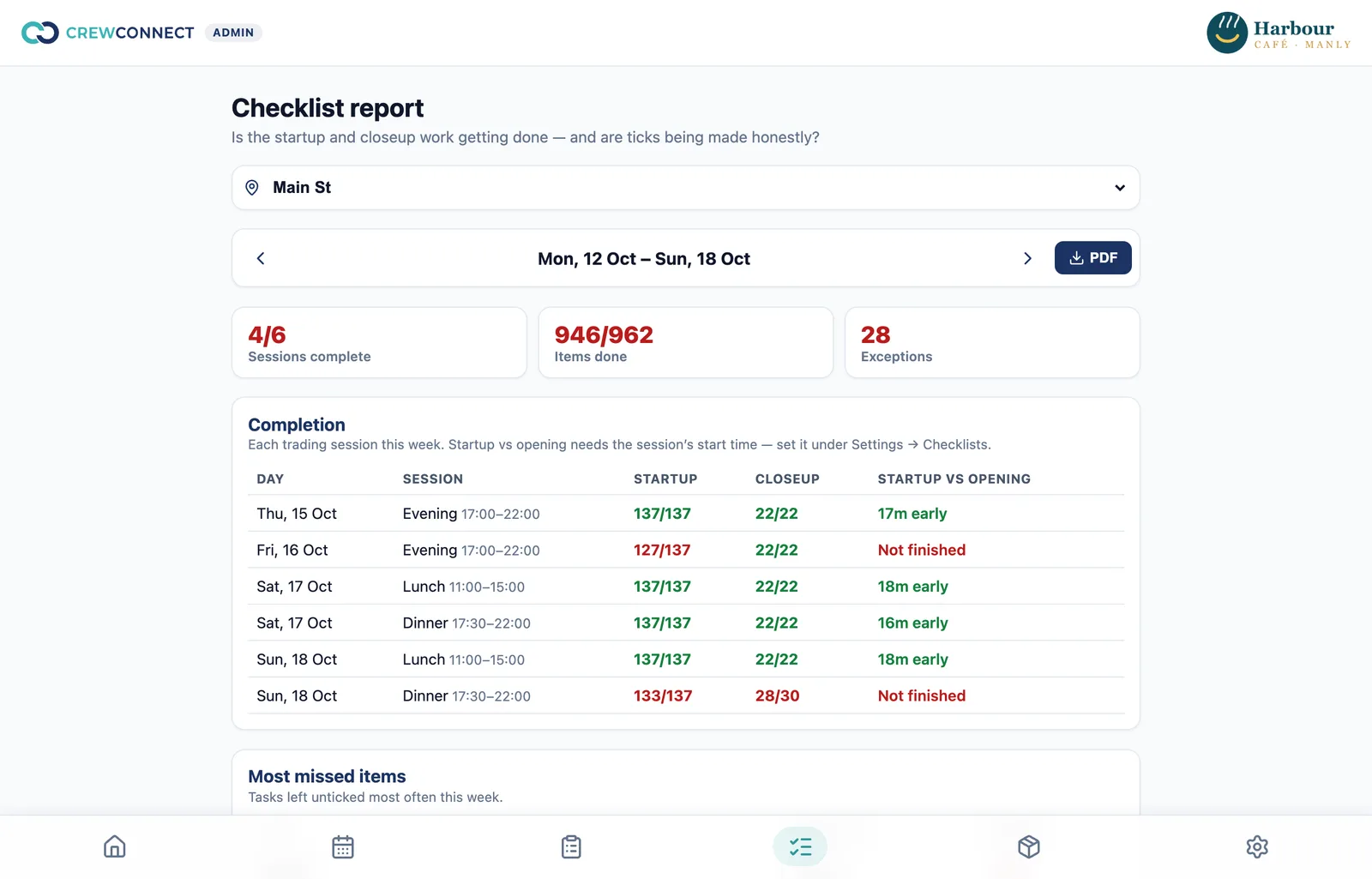
- A weekly report: completion rate, startup time against opening time, and the most-missed tasks.
- Flags for ticks made off shift, bursts of ticks in a few seconds, back-filled days and unticks, so a list ticked at 11 pm for the morning stands out.
Stock and supplier orders PRO
Nominated staff count stock on their phones, a restock list builds itself, and each supplier gets an approved purchase order as a branded PDF. When the delivery arrives, whoever's on shift marks it received and stock updates itself. See how stock control and purchase orders work.
What it costs
Rostering, the time clock and timesheets are free on Starter for up to 5 staff. Checklists, stock and purchase orders are on Pro: A$5 per user per month, any team size, with 50% off for the first 3 months for new customers. Groups with many venues can talk to us about Enterprise. We set up your roster, checklists, stock items and suppliers for free from what you use today.
Questions
Can I roster lunch and dinner as separate shifts?
Yes. Roster as many shifts as you need in a day. When someone works a split shift, each clock-in attaches to the right shift.
Can I see who did each checklist task?
Yes. Every tick records who did it and when, late ticks are marked, and the weekly report flags ticks made off shift or back-filled later.
Can I run more than one restaurant?
Yes, on every plan. Each location has its own roster, time zone, settings, checklists and stock, and you see wage cost for each one.
Does it calculate award rates?
No. You set each person's hourly rate; CrewConnect estimates wage cost on the roster and gives you hours and a pay summary for your payroll system. Award rates and penalties are on the roadmap.
Try it free — we'll set it up for you.
Starter is free for up to 5 staff. Pro adds checklists, stock and purchase orders, 50% off for your first 3 months. Free setup on every plan, with support from Australia.